
TABLE OF CONTENTS
- Which error are you seeing?
- Quick fix — using Electrum? (recommended)
- Quick fix — using any other wallet?
- Permanent fix
- Frequently asked questions
Which error are you seeing?
Error 1006 — "Gap Limit Exceeded"
Your wallet's gap limit was reached: too many payment addresses were generated in a row without receiving a payment. Often temporary — if it keeps happening, follow the quick fix below.
Error 1008 — "You are creating too many addresses/orders with no real payments"
Many orders were created without actual payments — usually test orders, or bots auto-triggering your checkout.
Error 1009 — "Unavailable gap limit funds"
Usually temporary: make sure you keep at least 0.0005 BTC in your credit balance, then try again. If it persists, contact support.
You may see these at checkout on your store ("Could not generate new address"), in an API response, or in an email alert from noreply@blockonomics.co — the fix is the same in every case.
Quick fix — using Electrum? (recommended)
First, in Electrum:
- Open your Electrum wallet and switch to the Console tab. If it's not visible, enable it via View → Show Console from the top menu.
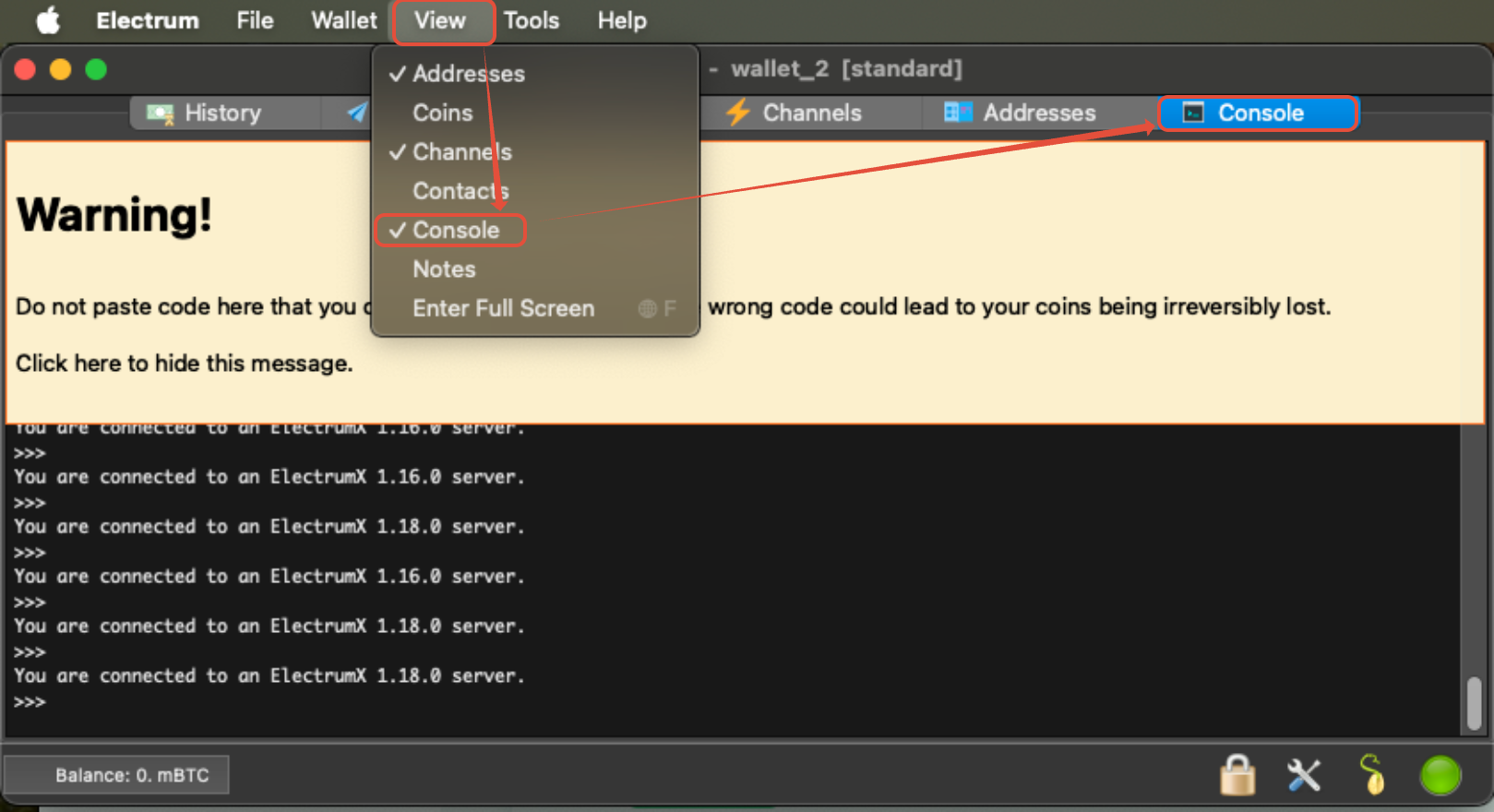
- In the console, enter the following command to set a new gap limit (any number between 20 and 500):
wallet.change_gap_limit(200)
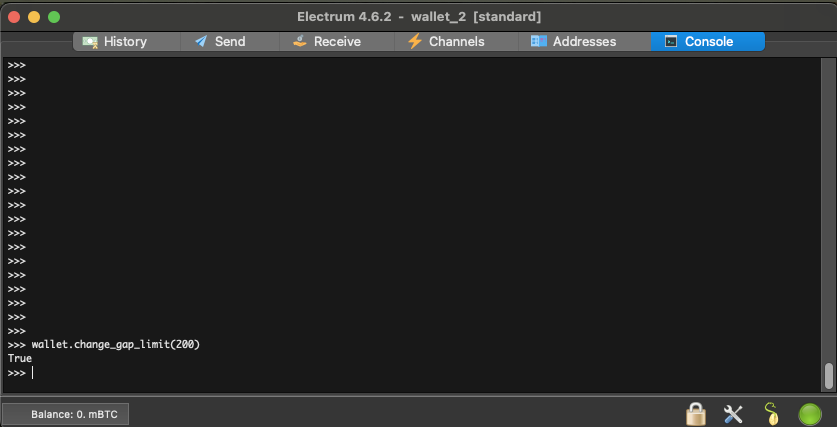
- Restart Electrum to apply the change.
- To verify, reopen the Console and enter:
wallet.gap_limit
It should display the value you set.
Then, in Blockonomics:
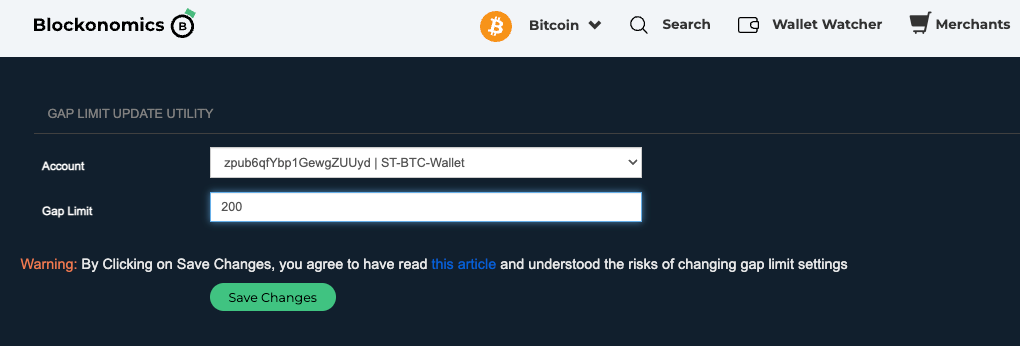
- Log in to Blockonomics and open the Gap Limit Utility.
- The Account dropdown lists your BTC wallets — select the one hitting the gap limit. Set the Gap Limit to the same value you used in Electrum (e.g. 200) and click Save Changes. (Leaving the field empty resets it to the default.)
Important: Your wallet and Blockonomics must use the same gap limit value. If you are not using Electrum and only increase the gap limit in the Blockonomics utility, this will not help recover the missing payments.
The gap limit must also be increased in your wallet (Electrum) so that it can scan and recognise the addresses where the payments were received.
Quick fix — using any other wallet?
Most wallets (Blockchain.com, Exodus, etc.) do not support changing the gap limit. The fix here is to reset your address sequence by switching to a fresh wallet:
- Open your wallet app and create a new wallet or account — this generates a new xPub with a clean address sequence.
- Log in to Blockonomics and go to the Wallets section.
- Click Add a Wallet and add the new xPub.
- Reconfigure your store to use the new wallet — switching the store's payment method to the new wallet is what fixes the error.
- (Optional) Remove the old wallet from Blockonomics to keep your dashboard tidy.
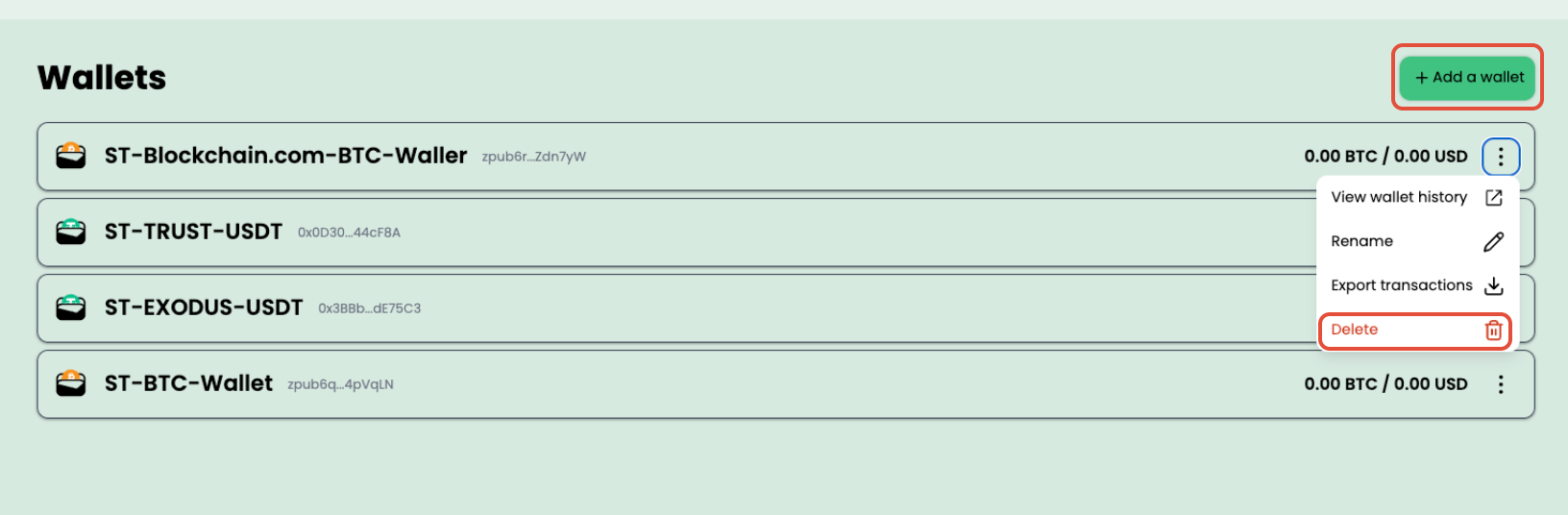
Note: your funds in the old wallet are safe either way — removing it from Blockonomics only unlinks it from your store, nothing more. You can always access your old wallet and funds from within your wallet app.
Permanent fix
- For high-volume stores: we recommend switching to Electrum with a gap limit of 200 as a long-term fix — it's the wallet that supports custom gap limits (most others are fixed), and this issue is likely to recur otherwise.
- Add a CAPTCHA or bot protection on your checkout page to prevent automated order creation.
- Maintain at least 0.0005 BTC in your Blockonomics credit balance — top up on the Billing page.
- If the error persists after topping up, contact support.
Frequently asked questions
What is the gap limit?
Bitcoin wallets scan ahead through a sequence of addresses to detect incoming payments. There's a limit to how many unused addresses in a row a wallet will "look ahead" through — that limit is the gap limit. If too many addresses go unused consecutively, your wallet stops scanning, and new payments may appear on the blockchain but not in your wallet.
What are gap limit fill-up transactions?
When around 20 consecutive addresses go unused, Blockonomics automatically sends a tiny fill-up transaction to keep your wallet in sync. The small deduction is only the Bitcoin network fee, not a charge from Blockonomics. To keep this running smoothly, maintain at least 0.0005 BTC in your credit balance.
How do I test my checkout without hitting the gap limit?
Use Test Mode — simulated test payments don't create real addresses, so they never consume your gap limit. Repeatedly running real checkouts without paying is exactly what triggers the "too many addresses/orders" error.